
You put your earbuds in the case, expect them to charge… and nothing happens. No light, no battery increase, just frustration.
If you’ve been searching for why won’t my earbuds charge or dealing with earbuds not charging, you’re not alone. This issue is surprisingly common, and in most cases, it’s not as serious as it feels.
Here’s the good news. You can usually fix it yourself in a few minutes.
Let’s walk through what’s actually going wrong and how to fix it step by step.
How Earbud Charging Actually Works
Before fixing the problem, it helps to understand what’s happening.
Wireless earbuds don’t charge directly from a cable. The charging case stores power and transfers it through tiny metal pins when the earbuds are placed inside. If anything interrupts that connection, charging stops.
Even a small issue like dust or misalignment can break the connection completely.
The Real Reasons Your Earbuds Are Not Charging
1. Dirt Is Blocking the Charging Connection
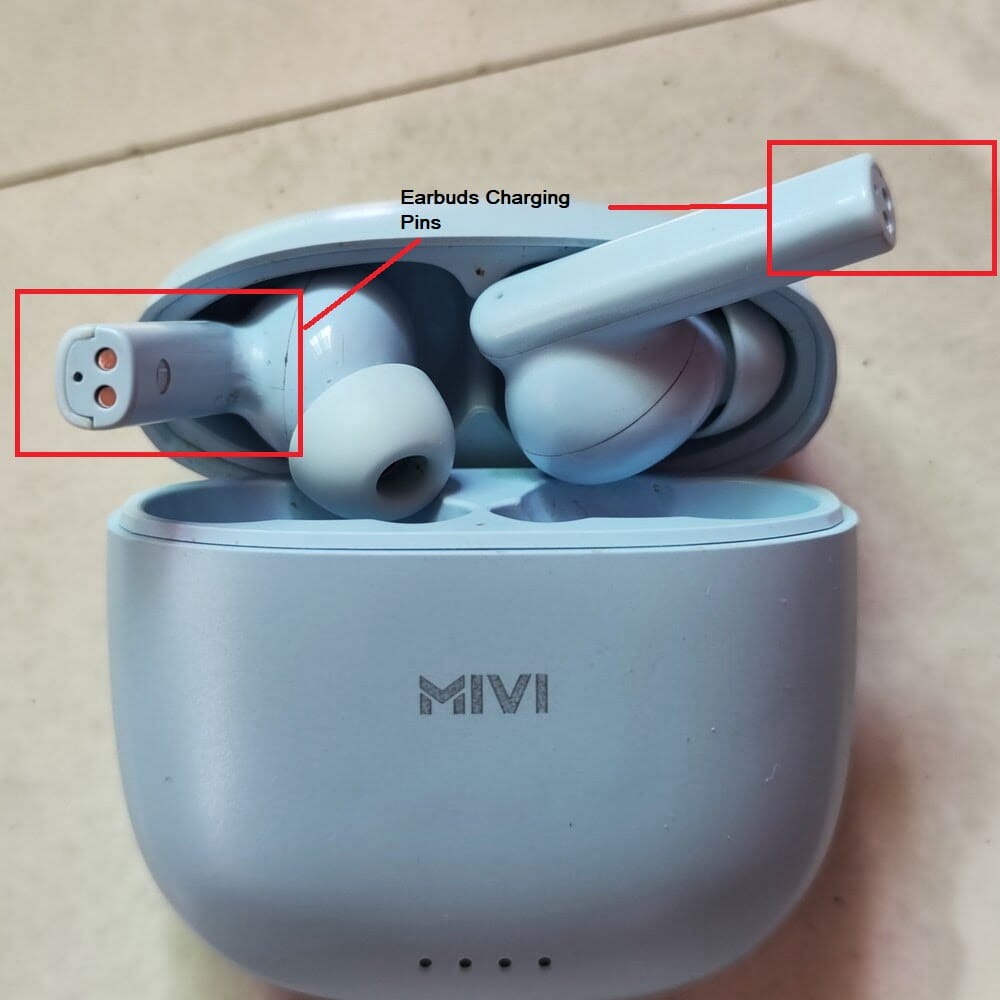
This is the biggest reason behind earbuds not charging in the case.
Over time, earwax, dust, and skin oils build up on the charging contacts. Even if everything looks clean, a thin invisible layer can stop electricity from flowing properly.
If you carry your earbuds in your pocket or bag, this becomes even more likely.
2. Your Charging Case Might Be Dead
A lot of people miss this.
If the case battery is low, it won’t charge your earbuds at all. Even if the earbuds are perfectly fine, they won’t receive power unless the case itself is charged.
So if your earbuds are not charging, always check the case first.
3. The Earbuds Aren’t Sitting Properly
Sometimes the earbuds look like they’re placed correctly, but they’re slightly off.
Even a tiny misalignment can stop the charging pins from touching. This is one of the most overlooked reasons behind earbuds not charging in case properly.
4. Faulty Cable or Charger
If your charging case isn’t charging, your earbuds won’t either.
A damaged cable or incompatible adapter can block power completely. This is especially common if you’re using cheap or old charging cables.
5. Charging Pins Are Damaged
Those small metal pins inside the case are fragile.
Over time, they can bend, wear out, or get corroded. When that happens, power can’t transfer to your earbuds anymore.
6. Software or Firmware Glitches
Not all charging problems are physical.
Sometimes, earbuds may malfunction due to minor firmware issues, causing the case to not recognize them or resulting in charging problems. In many cases, simply rebooting your phone can resolve the issue.
7. Battery Wear and Tear
If your earbuds are a few years old, the battery might be the issue.
Lithium batteries don’t last forever. After enough charge cycles, they stop holding power or refuse to charge properly.
8. Water or Moisture Damage
Sweat, humidity, or accidental splashes can damage internal components.
Even a small amount of moisture can interfere with charging and cause long-term problems.
9. Temperature Can Affect Charging
Extreme heat or cold can stop earbuds from charging.
Most devices have built-in protection that prevents charging outside safe temperature ranges.
How to Fix Earbuds That Won’t Charge
Now let’s get practical.
If your Bluetooth earbuds are not charging, go through these steps one by one.
1. Clean the Charging Contacts
You may want to start with this step, as it often resolves most issues.
Try using a dry cloth, cotton swab, or soft brush to clean both the earbuds and the case. It’s best to avoid pouring liquid directly into the charging area. If the issue persists, you might consider gently scratching the charging pins on both the case and earbuds with a pointed safety pin.
This step will likely restore charging of the earbuds.
2. Reinsert the Earbuds Carefully
Take them out and place them back slowly.
Make sure they sit correctly and snap into place. If needed, adjust them slightly until the charging indicator turns on.
3. Charge the Case Fully
Plug in your case and let it charge completely.
Once the case has enough power, try charging your earbuds again. This step alone often fixes the issue.
4. Switch the Cable or Adapter
Try a different charging cable or wall adapter.
If your case suddenly starts charging, you’ve found the problem.
5. Reset Your Earbuds
Most earbuds support a factory reset.
This clears bugs and software glitches that might be causing charging issues. The exact method depends on your brand, but it usually involves holding the button on the case.
6. Update Firmware (If Available)
Some earbuds have companion apps.
If yours does, check for updates. Firmware updates often fix hidden bugs, including charging problems.
7. Test Each Earbud Separately
If only one side isn’t working, you’re dealing with a one earbud not charging issue.
Try placing each earbud in the case individually. This helps you identify whether the problem is with one unit or the entire system.
8. Inspect for Physical Damage
Look closely at the charging pins and earbuds.
If you see bent pins, corrosion, or cracks, the issue is likely hardware-related. In that case, repair or replacement might be the only option.
How to Know If Your Earbuds Are Charging
Sometimes the problem is not charging… it’s just unclear feedback.
Here’s how to confirm:
- LED light turns on when placed in the case
- Battery icon appears on your phone
- Charging animation or sound
If none of these appear, there’s likely a connection issue.
When It’s Time to Replace Your Earbuds
Not every problem is fixable.
You should consider replacing your earbuds if:
- They don’t hold charge at all
- The case no longer powers them
- Internal damage is visible
- They are several years old and unreliable
At that point, spending time fixing them usually isn’t worth it.
How to Prevent Charging Problems in the Future
Once your earbuds are working again, keeping them that way is simple.
Clean them regularly. Don’t wait until dirt builds up. In fact, experts warn that aggressive cleaning can damage earbuds, so gentle, regular cleaning is the safer approach.
Keep them dry, especially after workouts. Avoid dropping the case. And try not to drain the battery to zero too often.
Small habits like these make a big difference over time.
FAQs
Usually dirt, misalignment, or battery wear on one side.
No. Most wireless earbuds rely entirely on the case.
It’s often due to dirty contacts, weak cables, or battery aging.
Most last around 2 to 3 years before battery performance drops.
Final Thoughts
If your earbuds are not charging, don’t assume they’re broken.
Most of the time, it’s something simple like dirt on the contacts, a dead charging case, or a minor alignment issue.
Start with the basics. Clean them. Reinsert them properly. Check your cable.
In many cases, that’s all it takes to bring your earbuds back to life.

Comments
Loading…