
Messaging someone on WhatsApp usually starts with saving their number to your contacts. But what if you only need a quick, one-time conversation? Maybe you’re contacting a delivery driver, a freelancer, a marketplace seller, or a customer support agent. Saving every temporary number can clutter your address book and compromise your privacy. The good news: you don’t have to save a contact to send a WhatsApp message. There are several built-in methods and simple workarounds that let you start a chat instantly, and you can send WhatsApp messages without saving the number.
Let’s explore all the reliable ways to send WhatsApp messages without saving a number.
1. Use WhatsApp’s Click-to-Chat Link
WhatsApp itself offers a built-in feature that lets you open a chat with any number using a URL. It’s called Click to Chat, and it works on mobile and desktop browsers.
Here’s how:
- Open any browser (Chrome, Safari, Firefox).
- In the address bar, type: https://wa.me/COUNTRYCODENUMBER
Replace COUNTRYCODENUMBER with the full number you want to message, including country code, but without the + sign or spaces.
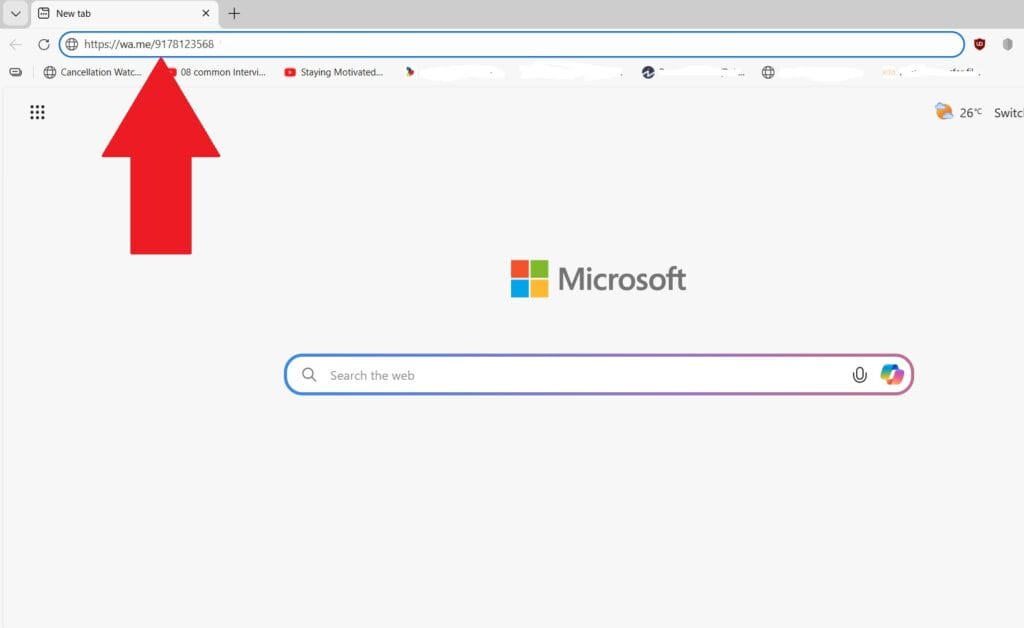
For example:
- To message someone in India:
https://wa.me/913001234567 - For the UK:
https://wa.me/447911123456
After entering this link, hit Enter, and you’ll see a button that says Continue to Chat. Tap it, and WhatsApp will open a chat window for that number – no saving required.
Pro tip: You can even add a pre-written message in the link. Just append ?text= followed by your text. Spaces become %20. For example: https://wa.me/923001234567?text=Hi%20there!
This opens the chat with “Hi there!” already typed in.
2. Paste the Number in Your Own Chat
This is less obvious but works well on WhatsApp itself. Instead of saving the number, paste it into your own chat thread (the one labelled “You”).
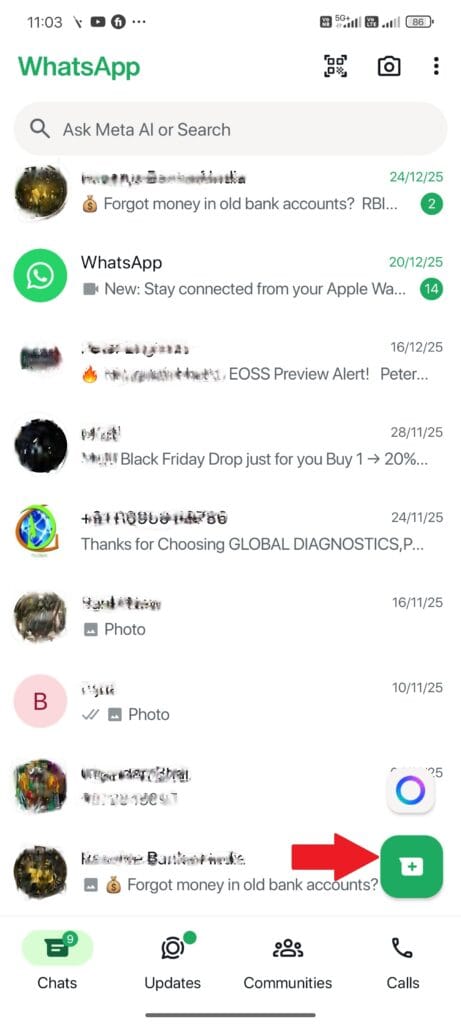
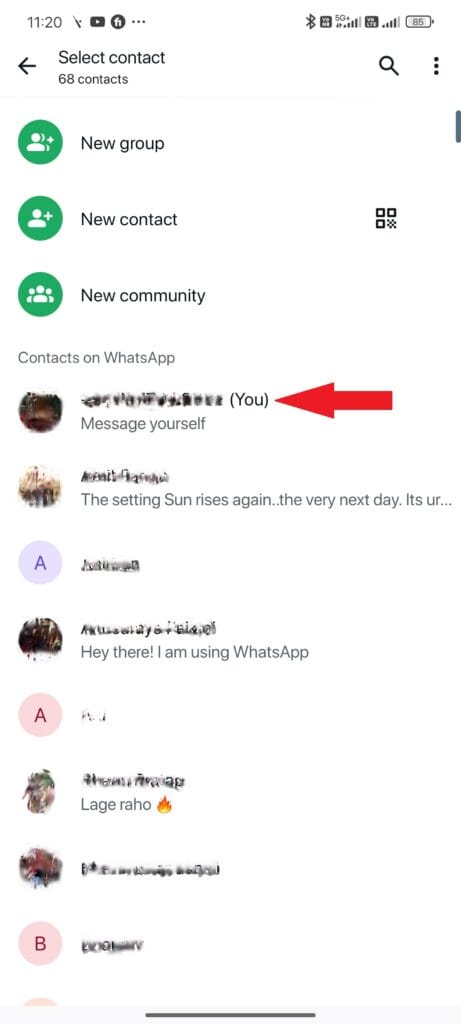
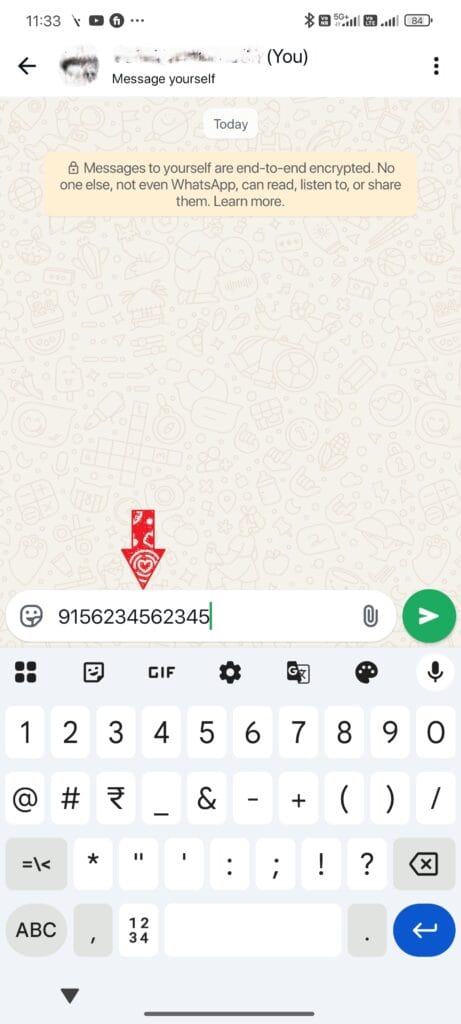
- Open WhatsApp and tap on the compose message button icon
- Choose the message yourself option.
- Paste the full phone number (with country code).
- Send it like a regular message.
- The number now appears as a link.
- Tap the link and choose Chat with {number}.
It’s a neat workaround when you don’t want to leave the app or use a browser.
3. Using the In-App Search Feature
As of recent updates, WhatsApp has improved its internal search engine to recognise phone numbers that aren’t in your address book. This is perhaps the most “native” feeling method.
Steps for Android & iPhone:
- Open WhatsApp and go to your Chats tab.
- Tap the Search icon (magnifying glass).
- Type the full phone number into the search bar.
- WhatsApp will search your contacts first. When it doesn’t find a match, it will look through its global database.
- If the person is on WhatsApp, their number will appear under a section titled “Not in your contacts.”
- Simply tap the “Chat” button next to their name.
4. Message Directly from a Group
If you’re in a WhatsApp group and someone’s number isn’t in your contacts, WhatsApp lets you message them anyway.
Here’s how:
- Open the group chat.
- Tap the number of the person you want to message.
- A small menu pops up. Tap Message {number}.
That opens a private chat without saving the number.
5. Google Assistant (Android) – Hands-Free Messaging
If you’re on Android, Google Assistant can send a WhatsApp message to an unsaved number with your voice.
Just say: Hey Google, send a WhatsApp to +913001234567
Then dictate the message. The Assistant opens WhatsApp and sends the message for you.
This is especially useful when you’re driving or multitasking.
6. Siri Shortcuts (iPhone) – One-Tap Messaging
If you are an iPhone user and frequently find yourself messaging new people, you can automate this entire process using the Shortcuts app.
How to Create the Shortcut:
- Open the Shortcuts app and tap + to create a new one.
- Add the action “Ask for Input.” Set the input type to Number.
- Add a second action: “URL.” 4. In the URL field, type https://wa.me/ and then select the “Provided Input” variable from the previous step.
- Add a final action: “Open URLs.”
- Save it as “Quick WhatsApp.”
Now, whenever you run this shortcut, it will ask for a number and immediately whisk you away to a new chat window. You can even add this shortcut to your home screen as a widget!
7. Use Third-Party Apps
Apps like Truecaller let you look up a number and start a WhatsApp chat without saving it.
Here’s the simple flow:
- Open Truecaller.
- Search for the number you want to message.
- Tap the WhatsApp icon next to it.
If that number is on WhatsApp, the chat opens instantly.
There are also dedicated apps (and bookmark tools) that let you send WhatsApp messages without saving the number. Just be cautious – only use trusted apps to protect your privacy.
8. WhatsApp QR Codes
WhatsApp itself generates QR codes for chat links. If someone shares their QR code with you (or you generate one for yourself), scanning it instantly opens a WhatsApp chat without saving the number.
This works really well in business settings (menus, posters, flyers). Just scan, tap, chat.
When These Methods Don’t Work
There are a couple of caveats to keep in mind:
- The number still needs to be registered on WhatsApp. If it’s not, WhatsApp will show an error.
- The Click-to-Chat link only works with the correct country code and no special characters.
If you follow the format exactly, though, it’s reliable and fast.
Putting It to Use
These tricks aren’t just neat hacks. They’re practical for lots of real-world needs:
- A seller messaging a customer about an order.
- Temporary contacts like delivery drivers, contractors, or event vendors.
- Support teams sharing quick info without storing every number.
- Anyone who cares about keeping their contact list clean.
The Click-to-Chat link and QR codes work especially well in business or marketing – you can share the link on websites, social media, or emails so people can message you directly without saving your number.
Final Thought
You don’t need to clutter your contacts list just to send a quick message on WhatsApp. Whether you use a browser link, your own chat, group tapping, voice assistants, or trusted third-party tools, starting a conversation without saving a number is simple and efficient.
For most users, the wa.me link method is the fastest and most reliable solution. For power users, automation through Siri Shortcuts or Google Assistant offers additional convenience.
Choose the method that fits your workflow — and keep your contact list clean and organised.
Read more about:
How To Tell If Someone Blocked Your Number on Android
How to share your location in Google Maps on Android and iOS

Comments
Loading…