
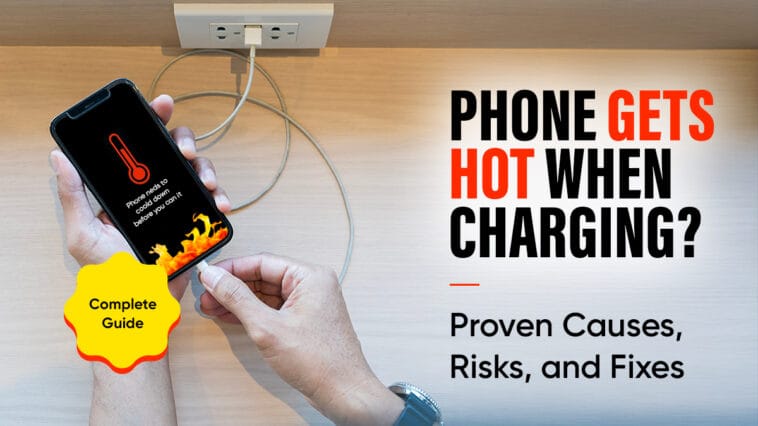
If your phone gets hot when charging, you’re not alone. Millions of users experience this daily, whether they’re using Android, iPhone, fast chargers, wireless chargers, or even power banks. While mild warmth during charging is normal, excessive heat is a warning sign that something isn’t right – either with your charger, your battery, or the way you use your phone.
This comprehensive guide breaks down all the proven causes, what overheating can do to your device, and – most importantly – simple fixes to stop your phone from getting hot while charging. Whether you’re looking for a quick answer or detailed troubleshooting, you’ll find everything you need here.
Why Does Your Phone Get Hot When Charging? (Most Common Reasons)
Understanding why a phone heats up during charging is the first step toward fixing it. Below are the most frequent and proven causes.
1. Fast Charging Generates Extra Heat
Modern phones support fast charging technologies like Quick Charge, Power Delivery (PD), SuperVOOC, HyperCharge, and TurboPower. These deliver high voltage and wattage in a short period, forcing the battery to draw more power – especially when it’s below 50%.
The outcome?
✔ Faster charging
✘ More heat buildup
If your phone overheats while fast charging, switch to a standard charger or enable “Optimized Charging Mode.”
2. Using the Phone While Charging
This one catches a lot of people. You plug it in, open YouTube, start scrolling, or play a game. Meanwhile, the phone is trying to charge and perform heavy tasks at the same time. The processor works harder, the battery discharges and charges simultaneously, and the heat spikes.
If your phone runs hot every time you use it while charging, the fix is simple: let it rest.
3. Low-Quality, Fake, or Damaged Chargers/Cables
Cheap third-party chargers often deliver unstable power, causing:
- Voltage spikes
- Fluctuating current
- Poor heat management
This directly heats the battery and internal circuits.
Always use:
✓ Original chargers
✓ MFi-certified (for iPhones)
✓ Standard-certified chargers (QC/PD)
4. Charging in a Hot Environment or Poor Ventilation
Heat has to escape somewhere. When your phone sits:
- Under a pillow
- On a sofa
- In direct sunlight
- Inside a car
- On blankets
- Near a heat source
…the temperature builds up rapidly.
Temperature Impact Table
Environment Temp | Expected Phone Behavior | Risk Level |
<20°C (68°F) | Cool & stable charging | Low |
20–30°C (68–86°F) | Slight warmth, normal | Low |
31–35°C (87–95°F) | Warms faster, slower charging | Medium |
36–40°C (96–104°F) | Noticeably hot surface | Medium–High |
>43°C (104°F) | Overheating, auto-shutdown possible | High |
Enclosed space | Heat trapped | Very High |
Tip: Charge on a flat, open surface and remove the case if needed.
5. Background Apps or System Activity
If your phone gets hot when charging, even when you’re not using it, the cause may be:
- App updates
- Cloud syncing
- Software bugs
- System indexing
- Crash loops
- App freeze
Check your background processes and kill unnecessary apps or the offending app.
6. Battery Aging and Health
Older batteries lose their ability to regulate heat effectively. A 2–3-year-old phone is more likely to heat up due to:
- Worn internal cells
- Inefficient power flow
- Higher resistance
This can eventually lead to shutdowns or failed charging.
7. Heat Trapped by a Phone Case
Rubber or rugged cases often act like insulation, preventing heat from escaping.
If your phone is overheating:
✔ Remove the case
✔ Charge on a cooler surface
What Happens If Your Phone Keeps Overheating?
Occasional warmth is okay. Consistent overheating is not. Over time, excessive heat can cause:
1. Permanent Battery Damage
High heat accelerates:
- Capacity loss
- Chemical degradation
- Charging inefficiency
A battery exposed to repeated overheating can lose up to 20% lifespan per year.
2. Faster Wear and Tear of Internal Components
Everything from your motherboard to your CPU is sensitive to thermal stress. Overheating can weaken solder points and chips.
3. Slower Charging Speeds
Modern phones automatically reduce charging speeds when they detect heat. This leads to:
- Longer charging times
- Intermittent charging
- Random pauses
4. App Crashing and Performance Issues
An overheating phone may:
- Lag
- Freeze
- Crash apps
- Reduce brightness
- Throttle performance
especially during gaming or video playback.
These issues build up silently, so it’s smart to address heat problems early.
What to Do When Your Phone Gets Hot While Charging
Use these proven fixes to cool down your phone quickly and safely.
1. Unplug the Charger Immediately
Don’t wait for a warning message. If the phone feels hotter than usual, stop charging. Let it cool for a few minutes before plugging it back in.
2. Stop Using the Phone and Close All Apps
Open apps force the processor to stay active, which creates heat. To help your phone cool down:
- Close all running apps
- Avoid video calls, gaming, or streaming during charging
- Put the screen to sleep and leave it alone
This alone solves the problem for many users.
3. Remove Problematic or Crashing Apps
A buggy app can run nonstop in the background and cause major heat buildup. If the issue started after installing a new app, check your battery stats.


On most phones:
- Go to Settings
- Select Battery
- Check the app list to see which apps are draining battery unnecessarily
- Force-stop the app and check if it fixes your issue.
- If it doesn’t help, try uninstalling the app or contacting the app developer about the unusual battery drain.
Remove anything suspicious or resource-heavy.
4. Turn Off Background App Refresh
Apps refreshing in the background quietly consume data and CPU power. That extra load creates heat during charging.
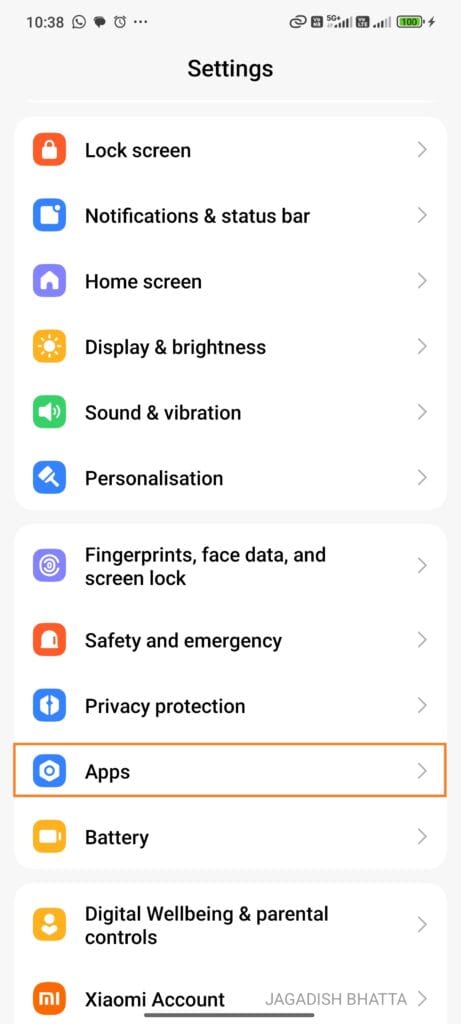
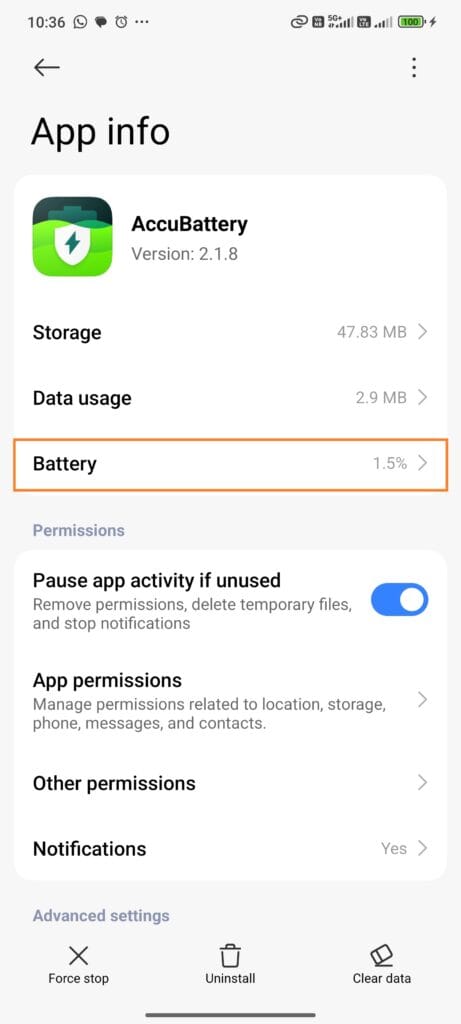
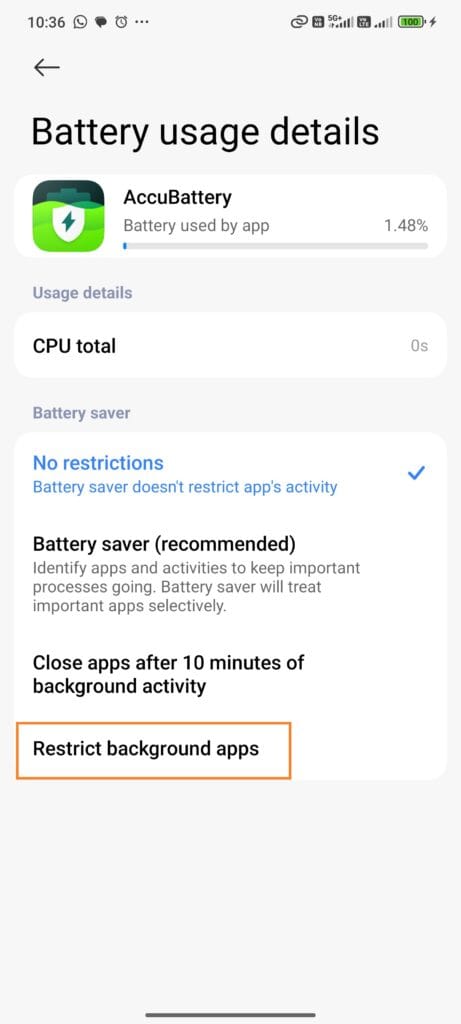
To disable it:
- Go to Settings
- Tap Apps
- Select an app from the list
- Tap on the battery
- Select restrict background apps
5. Remove the Phone Case
If your phone gets hot while charging, taking off the case improves airflow and prevents heat from getting trapped against the back panel.
Your phone instantly runs cooler.
6. Move the Phone to a Cooler Environment
Heat is often environmental, not technical. A cooler room or an air-conditioned space brings the phone’s temperature down quickly. You don’t need to freeze it – just allow airflow.
(Avoid placing the phone in a fridge. Sudden temperature shifts create moisture inside the device.)
7. Switch to Airplane Mode or Turn the Phone Off
Airplane mode turns off:
- Wi-Fi
- Data
- Mobile network
- Bluetooth
That means less work for the processor and faster, cooler charging.
Turning the phone off entirely gives the battery a break and eliminates all heat-producing processes.
8. Use a Cooling Pad or Small Fan
A mini fan or laptop cooling pad increases airflow and naturally regulates temperature.
This is especially helpful for:
- Gaming phones
- Phones with thick cases
- Power-hungry devices
9. Charge in Short Bursts Instead of 0–100%
Charging from 20% to 80% is proven to:
- Reduce heat
- Improve battery life
- Maintain optimal temperature
Avoid overnight charging.
10. Charge Using a Wall Outlet
Charging through laptops, car chargers, or power banks sometimes causes inconsistent power delivery. A stable wall outlet with a certified charger is usually the safest option.
How to Prevent Your Phone from Overheating While Charging
A few small habits can make a big difference over weeks and months. Here’s how to keep the heat problem from coming back.
1. Use High-Quality, Certified Chargers
Cheap chargers are the #1 cause of battery swelling and overheating.
Choose:
- Original chargers
- Apple MFi-certified cables
- Qualcomm QC-certified chargers
- PD-certified fast chargers
2. Avoid Charging in Hot or Enclosed Places
Never charge in:
- Hot cars
- Direct sunlight
- Under pillows
- In pockets
- On blankets
Your phone needs airflow.
3. Don’t Charge on Sofas or Beds
Soft surfaces trap heat.
Use:
✔ Wood
✔ Marble
✔ Glass
✔ Metal surfaces
4. Close Background Apps Before Charging
A quick swipe-up to close apps reduces CPU strain and cuts heat generation.
5. Update Your Software Regularly
Firmware updates often fix:
- Battery drain bugs
- Thermal issues
- App conflicts
Updated phones run cooler.
6. Activate Airplane Mode When Possible
If you don’t need to be connected, this is one of the most effective tricks.
7. Charge More Frequently, Not Less
Instead of waiting for your battery to hit 5% or 10%, charge earlier.
Low batteries draw more current, which generates more heat.
8. Clean the Charging Port
Dust causes connection problems, forcing the charger to compensate with more power, resulting in heat.
Use:
- Soft brush
- Compressed air
- Toothpick (gently)
FAQs About Phone Heating During Charging
Yes. Light warmth is normal. But if the phone becomes uncomfortable to hold, something is wrong.
You don’t need to panic, but you should address the issue. Frequent overheating damages the battery over time.
Yes. Unplug it, let it cool, then charge again once the temperature drops.
Yes. Apps like Google Photos, iCloud, WhatsApp, Facebook, and email sync services can cause continuous CPU usage.
Yes. Wireless charging is less efficient. Around 20–30 percent of energy can be lost as heat, especially if the phone isn’t well aligned on the pad.
Final Thoughts
If your phone gets hot while charging, don’t ignore it. A little warmth is fine, but consistent overheating tells you something needs to change – your charger, your setup, or your habits.
Start with the simplest fixes: remove the case, stop using the phone while charging, switch to a reliable charger, and keep the device cool. These small steps protect your battery, improve performance, and prevent long-term damage.
And if the heat issue refuses to go away? It might be time to let a technician take a look or replace an aging battery before it causes bigger problems.


Comments
Loading…